
Chapter 10 · 10.2
A notification for new mail
Do you keep the webmail open all day? Then you may want to see straight away when new mail arrives. The webmail can show you a notification or play a sound.
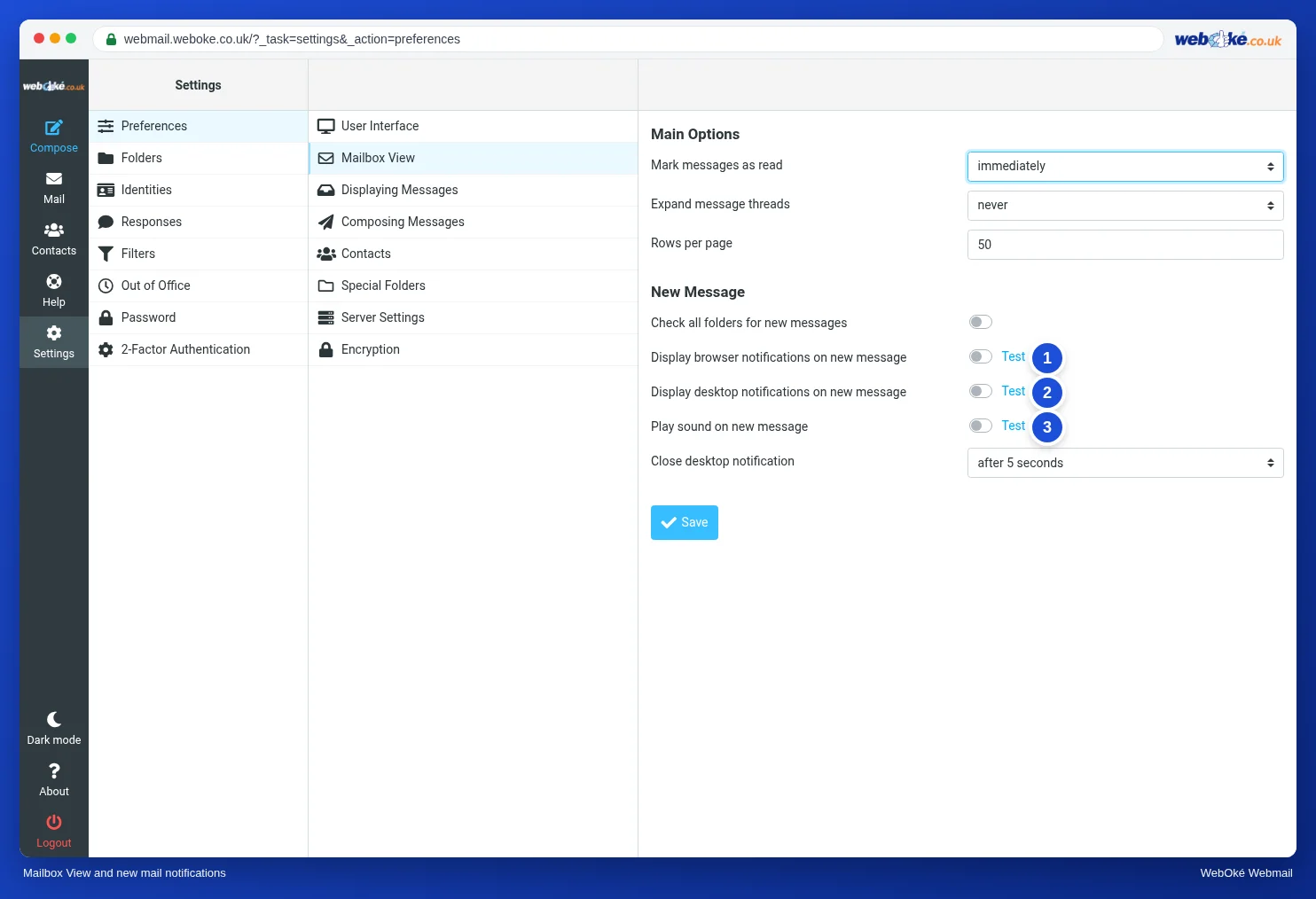
- Go to Settings, Preferences, Mailbox View.
- Under New Message, choose what you want:
- Display browser notifications on new message (1): the webmail tab shows that there is new mail.
- Display desktop notifications on new message (2): your computer shows a notification, even when you are working in another program. Your browser first asks whether the webmail may show notifications. Choose Allow.
- Play sound on new message (3).
- Use Test next to an option to try out the notification.
- Click Save.
New mail in other folders too
Do you use filters to sort your mail into folders? Then turn on Check all folders for new messages. Otherwise the webmail only checks your Inbox.
Please note: you only get a notification while the webmail is open in your browser. If you close the tab, you will not receive any notifications. Do you always want notifications, on your phone as well? Then use a mail app, see Webmail on your phone or tablet.